OCL GUI Validity Checking
In this chapter
- write an OCL invariant for a domain class
- see MontiGem connect it to the matching input field
- files you touch:
models/ocl/CustomerValidity.ocl
MontiGem can use OCL (Object Constraint Language) invariants to validate values that application users enter in GUI components. This is useful for domain rules that should be kept close to the data model, but should still be visible directly in a form.
In this chapter we add a validation rule for customer registration:
- the customer age must not be negative,
- the
Ageinput inCustomerCreateshould be marked invalid when the value violates that rule, - the tooltip should show an application-specific error message.
The important part for application developers is that the GUI model does not
need custom validation code. If a GemTextInput is bound to an attribute via
entry = customer.age, MontiGem connects OCL constraint violations on that
attribute to the input component.
Adding an OCL model
Create a new folder models/ocl and add the following file:
package validity;

import Carrental.*;

ocl CustomerValidity {
  context Customer customer inv:
    customer.age >= 0;
    shortError: "Age must not be negative: " + customer.age;
    error: "The customer age must be zero or greater, but is " + customer.age;
}
The file has the usual structure:
context Customer customer inv:declares that the following expression validates aCustomer.customer.age >= 0is the actual rule.shortErroris the message shown close to the invalid GUI input, for example in the tooltip.erroris the longer message used for the full constraint violation.
Both messages are mandatory. The short error should be concise and specific enough for a user to fix the input without reading technical details.
Note
MontiGem picks up every .ocl file in models/ocl/ automatically.
Regenerating the code
The generator does not see new files yet. Run the generation once with
--rerun-tasks:
./gradlew :backend:umlp2java --rerun-tasks
Then restart the backend and update the frontend:
./gradlew :frontend:generate
While generate runs, the frontend console may show a red TS2740 error for
a moment. It disappears when the build is complete.
The generator now produces a class carrental.validity.CustomerValidity in the
backend and in the frontend, and the generated Customer class calls it. You can
check that in backend/build/ocl2java/carrental/validity/CustomerValidity.java.
Note
Later edits of an existing .ocl file are picked up like any other model
change: restart the backend and run ./gradlew :frontend:generate.
Connecting the rule to a GUI input
The existing CustomerCreate component already binds the input fields to the
Customer attributes:
component CustomerCreate(Customer customer) {
  @GemCard(title = "Register customer", component = @GemColumn(width = "40ch", rowGap = "5px", components = [
    name@GemTextInput(labelText = "Name: ", entry = customer.name),
    email@GemTextInput(labelText = "E-Mail: ", entry = customer.email),
    age@GemTextInput(labelText = "Age: ", inputType = "number", entry = customer.age),
    register@GemButton(label = "Register", leftClick = createCustomer(customer))
  ]));
}
The relevant line is:
age@GemTextInput(labelText = "Age: ", inputType = "number", entry = customer.age)
The entry binding is enough for the generated GUI validity handling to relate
the input to Customer.age.
Scope of the automatic check
The automatic check works for input components that are bound with entry,
such as GemTextInput. If you set the validity parameter of such a
component yourself, your own check replaces the automatic one.
The input is marked, saving is not blocked
Validity checking marks the field and shows the message. It does not prevent the app from storing the value. If a rule must never be violated, check it in the command or the service that writes the data.
Trying it out
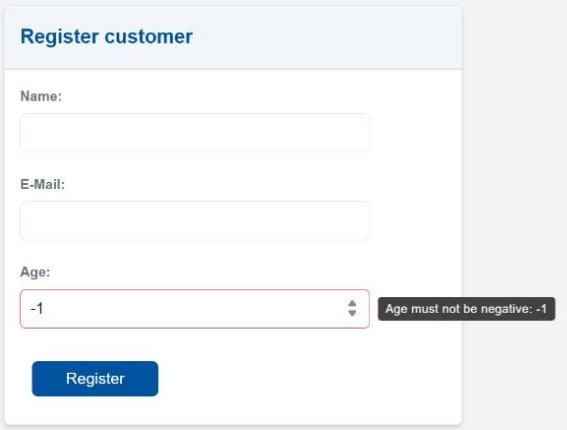
After starting the application, navigate to Customer overview and enter -1
in the Age field of the customer registration card: type 1, then put a
minus sign in front of it. The input is marked as invalid and on hover shows:
Age must not be negative: -1
Where did the minus go?
If you type the minus sign first, the field sometimes swallows it and
shows 1. Typing the digit first avoids this.
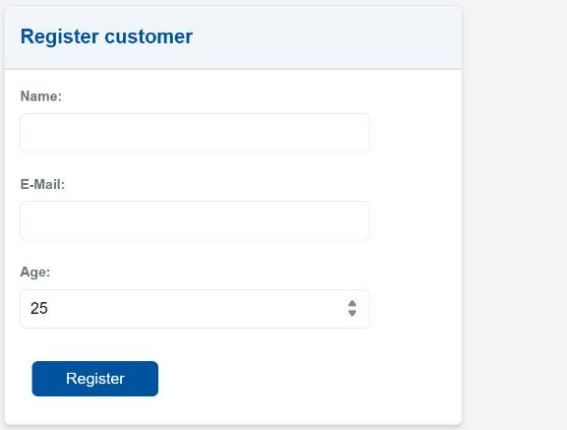
Change the value back to 0 or a positive number. The validity error
disappears.
Checkpoint
backend/build/ocl2java/carrental/validity/CustomerValidity.javaexists.- Entering
-1in theAgefield marks the field and shows the message. - Entering
0or a positive number clears the marking.