GUI Basics
In this chapter
- write your first GUI models
- build a navigation bar and reuse it on other pages
- load domain objects into a page and iterate over them
- files you touch:
models/Carrental.umlp,frontend/src/main/gui/gui/Start.gui,frontend/src/main/gui/gui/navigation/NavContainer.gui,frontend/src/main/gui/gui/SimpleCarList.gui,backend/src/main/java/carrental/CarrentalServerApplication.java
The source for the graphical user interface (GUI) of MontiGem apps are GUI DSL (domain-specific language for GUIs) models. The most basic concepts include:
- the GUI component (or simply component),
- control statements.
Note
A complete list will be discussed later, you may also take a look at the GUI DSL project (only available via GitLab invite).
GUI component
Each web page or reusable part of a page is described using a GUI model. The rough structure of a component is:
package mypackage.name;

import external.Component;
import some.external.Classdiagram.TypeName;
import maybe.java.TypeName2;

component ComponentName(TypeName paramName, TypeName2 paramName2) {
  /* component usages, control statements, etc. */
}
It contains
- a single package declaration,
- an optional list of imports,
- a single component declaration with the keyword
componentorpage. Apageis acomponentthat has its own URL address and can be navigated to, - optional contents of the component, e.g. component usages and control statements.
Note
Since a page is a component it can also be used as a component, see the
component usages further below.
Note
Optional contents mean that you can omit the curly braces and everything in between. This is used for more advanced cases which will be discussed later.
Info
You will often see the terms component declaration and component usage:
- A declaration means that you create a template for a specific component. It is similar to declaring a class in Java.
- A usage means that you create an instance of a specific component. It is similar to class instantiation (calling a constructor) in Java.
The car rental example already contains the Start.gui model:
package gui;

import mc.fenix.basic.GemText;
import mc.fenix.basic.GemLink;

page Start() {
  @GemText(value = "This is a tutorial application for developers learning to create a MontiGem app.");
  @GemLink(
    url = "https://monticore.pages.rwth-aachen.de/umlp/Tutorial.html",
    text = "Visit the tutorial page to learn how to build a MontiGem app."
  );
}
What the generator makes of it
Note
The following information about generated files is useful for understanding the app and when you want to override the default behavior.
A GUI model defines an Angular component. The generator writes its files to
frontend/build/gui2java. JSweet then translates the Java files to TypeScript
in frontend/build/gui2java2ts, and generate copies the result to
frontend/build/app/gui2java2ts, where the Angular build picks it up. The
following structures are generated from a component declaration:
- Java file:
Start.javawith the main component logic, such as loading and sending data, subscribing to changes in the data, and data conversions for presentation in the GUI. JSweet translates it toStart.ts. - TypeScript file:
StartComponent.tsthat connects Angular-specific features with the logic fromStart.java. The Angular component class in this file extends the class translated fromStart.java.- The file also includes a
configconstant that specifies the default Angular-specific configuration for the component.
- The file also includes a
- HTML template of the component:
Start.htmlwhose contents are defined by the contents of the component: component usages, control statements, etc. If there are no contents, the file is empty. - Although not directly generated from models, each
pagecontributes to the routing information file.page Startis inpackage guiwhich results in aGuiGemRouting.tsfile specifying that the URL pathgui/Startnavigates topage Start.
GUI component contents
A GUI component without contents doesn't show anything. To create a proper web page with contents you should import and use other components. This is the basic idea of any web framework for building GUIs: define some basic components, use them in other components to build new components, and repeat until you have an entire page.
The rough structure of a component usage is:
instanceName@ComponentName(paramName1 = arg1, paramName2 = arg2);
It contains:
- an optional instance name (a variable holding the component instance),
- an
@sign followed by the component name, - a list of arguments, where parameter assignment is done via the parameter name.
Note
This is similar to parameter assignment in Python or R. Assignment by order
(e.g. @ComponentName(arg1, arg2)) is not allowed.
Try it yourself. Replace the two component usages in the Start page of the car
rental example:
package gui;

import mc.fenix.basic.GemText;

page Start() {
  @GemText(color = "red", value = "My first component");
  @GemText(value = "second one");
}
Apply the change with:
./gradlew :frontend:generate
The result is a web page with text:
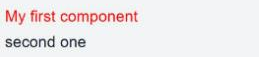
GemText is a library component. The library components can be found in the
documentation for library components.
A navigation bar
Showing text is a good start but it is not enough. In practice one of the first
steps is to create a navigation bar. Create the directory
frontend/src/main/gui/gui/navigation and in it a new file NavContainer.gui
with the following content:
package gui.navigation;

import mc.fenix.arrange.GemRow;
import mc.fenix.arrange.GemColumn;

import mc.fenix.navigation.GemNavItem;
import mc.fenix.navigation.GemNavList;

component NavContainer(List<GUIViewElement> content) {
  // row of components, from left to right: navigation bar, main content.
  @GemRow(colGap = "25px", components = [
    // navigation bar
    @GemNavList(width = "40ch", height = "100vh", components = [
      @GemNavItem(title = "Home", target = "/gui/Start"),
      @GemNavItem(title = "Simple car list", target = "/gui/SimpleCarList"),
      @GemNavItem(title = "Customer overview", target = "/gui/CustomerOverview")
    ]),
    // main content
    @GemColumn(hAlign = "center", components = content)
  ]);
}
NavContainer defines a template for a web page that has a navigation bar. It
consists of other library components and declares a list of GUIViewElement
objects as a parameter named content. The type GUIViewElement represents any
GUI component. Here the list of components is passed to the GemRow component
that renders the passed content from left to right. The definition of the
components parameter of GemRow is similar to content:
package mc.fenix.arrange;

component GemRow(
  List<GUIViewElement> components /*, other parameters */
)
GemNavList and GemNavItem are library components for building a navigation
bar. GemNavList is a layout container. GemNavItem is a button that redirects
a user to a part of the application via the URL specified by the target
argument. A URL is constructed from the fully qualified name of a page, compare:
gui.Start
gui.SimpleCarList
gui.CustomerOverview
and
/gui/Start
/gui/SimpleCarList
/gui/CustomerOverview
Whenever you add a page, you can add a corresponding navigation item (or a
GemLink) to enable navigation to the new page. You will add three more items
in the following chapters. More advanced cases will be discussed later.
Note
/gui/SimpleCarList does not currently navigate to any existing page. We
will add one later in this chapter.
Let's adjust the Start page and use NavContainer. We pass a list with the
previously created GemText components to the content parameter:
package gui;

import mc.fenix.basic.GemText;

import gui.navigation.NavContainer;

page Start() {
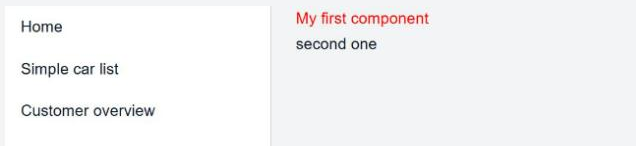
  @NavContainer(content = [
    @GemText(color = "red", value = "My first component"),
    @GemText(value = "second one")
  ]);
}
Run ./gradlew :frontend:generate again. The result is a web page with a
navigation bar and text:
Types of component parameters
NavContainer demonstrated the usage of the type GUIViewElement. There are
several notable types that are used as GUI component parameter types:
-
A subset of commonly used Java types
int,Integerlong,Longfloat,Floatdouble,Doublevoid,VoidStringList<T>Object
-
Types describing concepts of user interfaces
Event<T>GUIViewElement
-
Types imported from Java or from class diagrams
The arguments you supply to the components must be compatible with the parameter type. We omit some types for now and only use the most common ones:
- The commonly used types are self-explanatory, for example, the
valueparameter ofGemTextis aString:
component GemText(String value /*, other params */)
- A
Listof objects is created using square brackets (an OCL-like syntax). From the example earlier:
@NavContainer(content = [
  @GemText(color = "red", value = "My first component"),
  @GemText(value = "second one")
]);
Depending on the type, the content is different, e.g. a List<Integer>:
[1, 2, 3].
- You can import types from class diagrams. Here we discuss only the ones imported from a domain class diagram (the one that defines the data structure of the app). We will call those "domain types". Domain types are handled separately by MontiGem, since for objects of these types MontiGem generates multiple features, such as automatic updates of the objects in the GUI across different app users, saving the objects in the database, caching, etc.
A page that shows domain objects
We would like to have a page showing the list of cars. First add the class Car
to the domain class diagram:
class Car {
  String make;
  String model;
  String name;
}
Then create some cars in the initEntities() method. Use the makes Ford,
Toyota or VW, because the project ships pictures only for those:
Car ford = CarrentalManager.carBuilder()
    .make("Ford")
    .model("Mustang")
    .name("GT")
    .build()
    .get();

Car toyota = CarrentalManager.carBuilder()
    .make("Toyota")
    .model("Corolla")
    .name("LE")
    .build()
    .get();

Car vw = CarrentalManager.carBuilder()
    .make("VW")
    .model("Käfer")
    .name("Herbie")
    .build()
    .get();
Now create the GUI model for the page:
package gui;

// data class
import Carrental.Car;

page SimpleCarList(List<Car> cars) {
  /* ... */
}
Here we import the Car class from the domain class diagram. Whenever an input
parameter of a type from a class diagram is used, MontiGem generates logic to
automatically load the object if possible. Specifically here we use List<Car>
which loads all objects of type Car.
Note
There is also logic for loading a single Car which will be discussed
later.
Info
The types are imported using the so-called fully qualified names. The fully qualified name concept is general for programming languages: it is a name that uniquely identifies a type, method or variable, which is used by a compiler (interpreter, generator) to identify an entity.
In Java and the GUI DSL a fully qualified name of a type or component
consists of the package name (if present) and the type or component name
respectively, e.g. java.util.List, gui.navigation.NavContainer. In CD4A
(the class diagram language) the fully qualified name of a type consists of
the package name (if present), the class diagram name, and the type name,
e.g. somepackage.Carrental.Car.
Control statements
Now that we want to display a list of cars, we need to be able to go over the
list and show the details. Update the SimpleCarList page:
package gui;

import mc.fenix.basic.GemText;
import mc.fenix.arrange.GemColumn;

import gui.navigation.NavContainer;

// data class
import Carrental.Car;

page SimpleCarList(List<Car> cars) {
  @NavContainer(content = [
    @GemColumn(rowGap = "10px", components = [

      @GemText(value = "Car list", size = "2rem"),
      // iterate (loop) through cars and show their info
      @iterate(Car c : cars) {
        // if it's Ford then show that it costs more
        @guard(c.make.equals("Ford")) {
          @GemText(value = "Pricey!", color = "red");
        }
        else {
          @GemText(value = "Not pricey!", color = "green");
        }
        @GemText(value = "Model: " + c.model);
        @GemText(value = "Make: " + c.make);
        @GemText(value = "Name: " + c.name);
      }

    ])
  ]);
}
Separators inside a component list
Inside components = [ ... ] the entries are separated by commas. Inside
the block of an @iterate or @guard every component usage ends with a
semicolon, as in the example above. Mixing this up is the most common syntax
error in GUI models.
Besides the usual components we have the iterate and guard..else constructs.
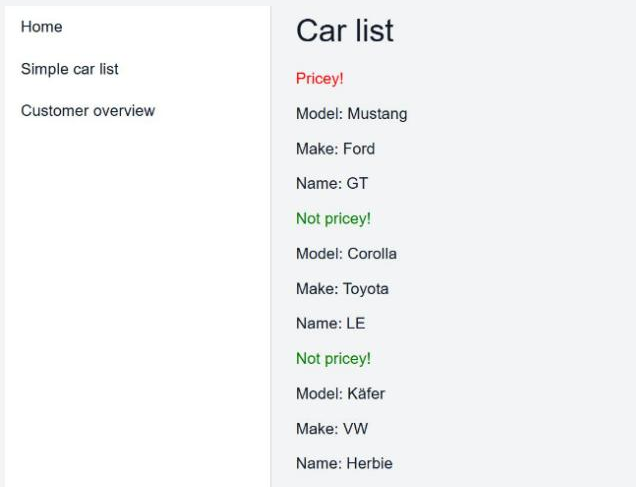
iterateis similar to aforloop: you can go through a list of elements and create an instance of a component for each element.guard..elseis similar toif..else: you can specify whether one or several components should be shown depending on a condition. Theelseblock is optional.
You changed the class diagram, so restart the backend and update the frontend:
./gradlew :frontend:generate
Depending on your dummy data, the simple car list page looks like this:
Why are they called iterate and guard instead of for and if?
Those constructs work a bit differently. Unlike in a normal program, these are evaluated "continuously", i.e. whenever some source of data changes, e.g. new cars are added or the name of a car gets changed, the changes are propagated at application runtime as soon as possible and are reflected in the GUI. This also applies to the components.
Checkpoint
- http://localhost:4200/gui/Start shows the navigation bar on the left and the two texts.
- http://localhost:4200/gui/SimpleCarList lists three cars. The Ford is marked "Pricey!", the other two "Not pricey!".
- The navigation items switch between the pages.