GemBarChart
A bar chart displays a value for each category as a rectangular bar, either horizontally or vertically, with the bar's length or height being proportional to its value. Categories are shown as Strings on one axis, and their values as integers on the other. If a category has multiple sub-categories (a second data dimension), their bars can additionally be stacked on top of each other or aligned side by side. For example, it can be used to compare monthly sales figures across different product categories, or to show stacked survey results (e.g. "agree", "neutral", "disagree") per question.
Usage Example
/* (c) https://github.com/MontiCore/monticore */
package example_charts;

import Domain.Person;
import mc.fenix.charts.GemBarChart;
import common.ExamplePage;

page GemBarChartExample(List<Person> persons)
{
  @ExamplePage(
    component = barchart@GemBarChart(
      data = null,
      stacked = false,
      maxValue = 10,
      minValue = null,
      showConfig = true
    ),
    basePath = "example_charts",
    componentName = "GemBarChartExample"
  );
}
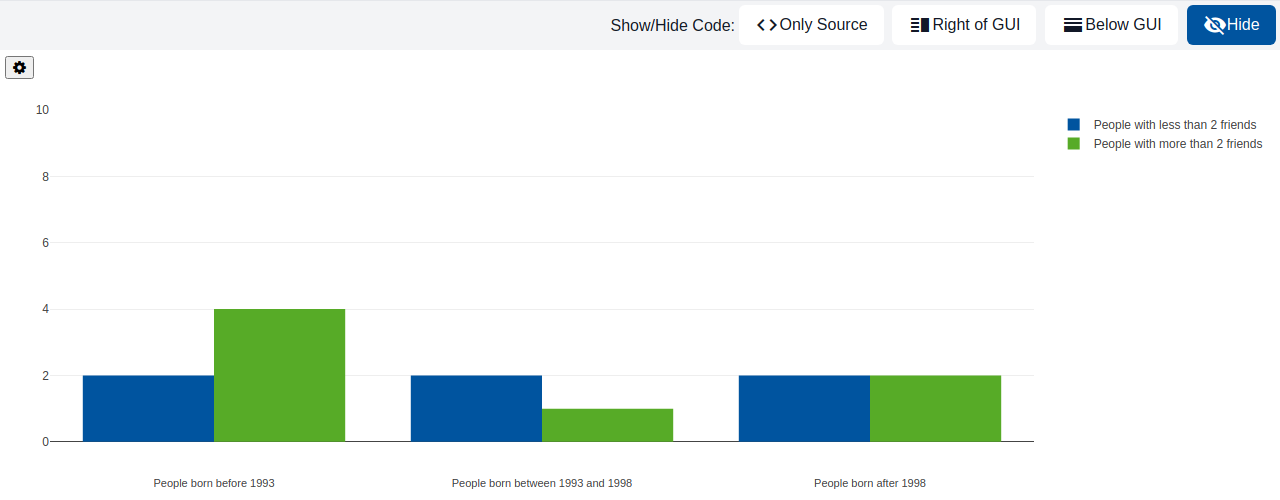
TypeScript implementation:
/* (c) https://github.com/MontiCore/monticore */
package example_charts;

import domain.Person;
import mc.fenix.charts.gembarcharttypes.GemBarChartData;
import mc.fenix.charts.gembarcharttypes.GemBarChartEntry;
import mc.fenix.charts.gembarcharttypes.GemBarChartEntryBuilder;
import umlp.jsweet.extension.annotation.Component;
import umlp.jsweet.extension.annotation.Serialized;

import java.util.ArrayList;
import java.util.Arrays;
import java.util.List;
import java.util.Optional;

@Component
public class GemBarChartExample extends GemBarChartExampleTOP {
  @Override
  @Serialized
  public GemBarChartData getBarchartData() {
    List<String> labels = Arrays.asList("People born before 1993", "People born between 1993 and 1998", "People born after 1998");

    List<GemBarChartEntry> dataEntries = new ArrayList<>();
    dataEntries.add(new GemBarChartEntryBuilder()
        .label(Optional.of("People with less than 2 friends"))
        .data(Arrays.asList(0, 0, 0))
        .build().get());
    dataEntries.add(new GemBarChartEntryBuilder()
        .label(Optional.of("People with more than 2 friends"))
        .data(Arrays.asList(0, 0, 0))
        .build().get());

    for (Person person : this.getPersons()) {
      int birthday = person.getBirthday().getYear();
      int numberFriends = person.getFriendsList().size();
      if (birthday < 1993) {
        if (numberFriends <= 2) {
          incrementFirstDataValue(dataEntries, 0, 0);
        } else {
          incrementFirstDataValue(dataEntries, 1, 0);
        }
      } else if (birthday >= 1993 && birthday <= 1998) {
        if (numberFriends <= 2) {
          incrementFirstDataValue(dataEntries, 0, 1);
        } else {
          incrementFirstDataValue(dataEntries, 1, 1);
        }
      } else {
        if (numberFriends <= 2) {
          incrementFirstDataValue(dataEntries, 0, 2);
        } else {
          incrementFirstDataValue(dataEntries, 1, 2);
        }
      }
    }

    return new GemBarChartData(dataEntries, labels);
  }

  private static void incrementFirstDataValue(List<GemBarChartEntry> dataEntries, int index1, int index2) {

    dataEntries.get(index1).getDataList().set(index2, dataEntries.get(index1).getDataList().get(index2) + 1);
  }
}
GUI Model
component GemBarChart(
  GemBarChartData data,
  Object displayValue,
  Boolean stacked,
  Boolean overlapping,
  Integer maxValue,
  Integer minValue,
  boolean showConfig = false
)
| Name |
Type |
Description |
Default value |
data |
GemBarChartData |
The data to be displayed in the chart. |
|
displayValue |
Object |
A function that formats a bar's raw numeric value into the string shown in its tooltip, e.g. (value) => value + " kg" to append a unit. |
|
stacked |
Boolean |
Whether the sub-categories of a bar are stacked on top of each other. |
|
overlapping |
Boolean |
Whether the sub-categories of a bar overlap each other instead of being placed side by side. |
|
maxValue |
Integer |
Maximum value shown on the value axis. |
|
minValue |
Integer |
Minimum value shown on the value axis. |
|
showConfig |
boolean |
Whether the chart's configuration panel is shown. |
false |
Types
GemBarChartTypes
package mc.fenix.charts;
import java.util.List;
import java.util.Optional;

<<pojoCD>>
classdiagram GemBarChartTypes {

  public class GemBarChartData {
    List<GemBarChartEntry> entries;
    List<String> labels;
  }

  public class GemBarChartEntry {
    Optional<String> label;
    Optional<String> stack;
    List<Integer> data;
    Optional<String> backgroundColor;
    Optional<String> hoverBackgroundColor;
  }

}
GemBarChartData
| Name |
Type |
Description |
Default value |
entries |
List<GemBarChartEntry> |
|
|
labels |
List<String> |
|
|
GemBarChartEntry
| Name |
Type |
Description |
Default value |
label |
Optional<String> |
|
|
stack |
Optional<String> |
|
|
data |
List<Integer> |
|
|
backgroundColor |
Optional<String> |
|
|
hoverBackgroundColor |
Optional<String> |
|
|